COMP9517 Notices
Notices
-
Project Mark Release
Posted by Haonan Zhong Monday 18 May 2026, 10:20:30 AM.
Hi everyone,
The marks for the project have now been released. You can view your mark via GIVE.
Each project submission has been carefully reviewed by two tutors, one course admin and one lecturer to ensure consistency and fairness. Because of this comprehensive review, no further adjustments to the marks will be considered.
Thank you for your efforts and engagement throughout the project.
COMP9517 Teaching Team
-
myExperience survey
Posted by Yang Song Thursday 30 April 2026, 06:42:14 PM.
Hi everyone,
Thanks to everyone who has completed the myExperience survey so far. If you haven’t participated yet, there are still a few hours left before it closes. Please log into https://myexperience.unsw.edu.au/ to complete the survey.
Your constructive feedback is valued, and helps not only us and students taking this course, but teaching staff across UNSW to create positive changes in the courses moving forward.
On behalf of the entire COMP9517 team, and with special thanks to our course admin and 26 tutors, we would really appreciate your support.
Regards,
Yang & Sonit -
Peer Review Form
Posted by Haonan Zhong Wednesday 29 April 2026, 07:46:16 PM.
Hi everyone,
Some students may receive a default Moodle late penalty notification regarding this assignment. Please note that this is an automatically generated Moodle message and cannot be changed from our side.
The peer review form is optional. No penalty will be applied if you choose not to complete it, and no late penalty will be applied for late submissions.
Kind regards,
COMP9517 Course Admin Team -
A few notes
Posted by Yang Song Tuesday 28 April 2026, 09:36:17 AM.
Hi everyone,
We will need about three weeks to finalise the project marking, as this allows time for a thorough review and moderation of marks to ensure consistency across all groups. We will also adjust marks to reflect individual contributions, based on the information provided in the peer review forms.
In case you missed our previous announcement, example exam questions are here under Assessments > Exam.
If you have any questions, please continue to use the Course Forum. We will monitor it up until the exam day. Good luck with your final exam!
Regards,
Yang -
myExperience Survey closing in 2 days
Posted by Sonit Singh Tuesday 28 April 2026, 09:03:32 AM.
Dear Students,
Thanks to everyone those who have filled the myExperience survey. As of today, we got 29% participation rate.
For those who have not yet completed it, please take a moment to fill out the myExperience Survey, which will close on 30 April 2026. A strong participation rate is important to ensure the results are meaningful and statistically reliable.
Please log into https://myexperience.unsw.edu.au/ or to Moodle course page and fill in the survey.
Kind regards,
Sonit -
Instructions from Inspera
Posted by Yang Song Friday 24 April 2026, 05:11:01 PM.
- You need your UNSW student ID card to sit your final exams on campus. Electronic IDs will not be accepted. Your UNSW student ID card will be scanned at the exam venue as part of a new attendance checking process.
- If you are unable to provide your UNSW student ID card, you may not be able to sit your final exam. You can go to the Student Hub and get a new or replacement student ID card. New ID cards and replacements for expired cards are free; the cost of a replacement student card is $25. The Student Hub is NOT open on Saturdays.
- Prepare for your Inspera exam on campus:
Student info invigilated exams PDF - Ensure you know when and where your exam is:
Understanding your exam timetable PDF - And most importantly, ensure that you have the correct SEB versions (these are different from last Term):SEB for Mac (version 3.5.4)
SEB for Windows (version 3.10.0) *
* For Windows – Your device can only have one correct SEB version installed. You will need to uninstall the incorrect SEB version prior to the exam.
During the Term 1 2026 final exam session, an onsite IT Helpdesk will be available to support students from Friday 1 May to Thursday 14 May. Find it in the John Niland Scientia Building Foyer, G19 on the Campus Map. No booking required!
Operating Hours:
- General queries: Monday to Saturday, 10am - 12pm and 2pm - 4pm
- Students sitting an exam only: Monday to Saturday, 8.30am - 10am and 1pm - 2pm
- You need your UNSW student ID card to sit your final exams on campus. Electronic IDs will not be accepted. Your UNSW student ID card will be scanned at the exam venue as part of a new attendance checking process.
-
Peer Review Form
Posted by Haonan Zhong Friday 24 April 2026, 09:01:51 AM.
Hi everyone,
The peer review for all groups is now open. This is for each member of the group to enter a participation percentage for all their own group members, including themselves. Please complete this activity by Wednesday, 29 April 2026, 18:00 PM.
To enter the peer review, login into Moodle and click on Review your project team contribution. Click 'Add submission' and submit an empty file. You will be taken to the review page, where you can select the percentages of all team member contributions, and optionally add comments. Comments, if any, should include a statement about your own contribution and the contributions of all other members. If applicable, please add links to any supporting evidence.
Here are a few notes for the submission:
- Please do not submit your comments/peer evaluation in a file under the assignment file submission link, as it is only used to enable the percentage slider & comments section. Please submit an empty file there.
- Please verify that your group members are listed correctly. If you notice any mismatch, kindly reach out to us.
- IMPORTANT: If you do not follow these steps, your comments might be viewable by other group members.
- We highly encourage all group members to enter their peer review, especially if they have any concerns about the contributions. If you have emailed us before, please do enter them in the form again for better tracking. Note: we do not need screen captures, etc.
If you have any questions or there are any issues, please get in touch via email
cs9517@cse.unsw.edu.au
Haonan
-
Week 10
Posted by Yang Song Wednesday 15 April 2026, 10:33:17 AM.
Hi everyone,
As we're approaching the final week of this term, just to reiterate our plan for Week 10.
In Week 10, we'll use the Monday lecture as a review session. Both Sonit and I will be in the lecture room to go through all the important slides from Weeks 1 to 9, which will be useful for preparing for the final exam. You can attend the lecture or watch the recording on Echo360 afterwards. There will be no lecture slides upload on WebCMS3 for Week 10 as we'll just use the lecture slides from Weeks 1 to 9.
There's no lecture on Friday in Week 10. Instead, we have uploaded several guest lecture recordings on Echo360, given by colleagues in the school and collaborators, showcasing advanced applications of computer vision. These are for your interest only and will not be included in the exam.
If you have any questions related to the project, we'll be happy to answer them during Monday's lecture as well. See you soon.
Regards,
Yang -
myExperience Survey
Posted by Sonit Singh Wednesday 15 April 2026, 09:25:54 AM.
Dear Students,
Thanks to all of you who have completed the myExperience survey so far!
Your honest and constructive feedback is valued, and helps not only students taking this course, but also teaching staff across UNSW to create positive changes in their courses moving forward. Your thoughts also make a difference for the next group of students taking these courses, just as thoughts from students taking courses you plan to take make a difference for you.

Please know that myExperience is confidential and your identity is not included in reports. Results of the survey are not made available until your course results are released.
If you haven't yet participated, you can find link to myExperience in Moodle or alternately Please login https://myexperience.unsw.edu.au/ or follow the link in your email to access the survey.
Cheers,
COMP9517 Teaching Team -
Project Submission Links Available
Posted by Haonan Zhong Monday 13 April 2026, 02:43:49 PM, last modified Monday 13 April 2026, 02:44:34 PM.
Hi everyone,
Project submission links are available under WebCMS3 > COMP9517 > Assessments > Group Project.
Please be reminded to submit only one copy of your project per team (one member of the team should submit the project on behalf of the group), and be aware of the submission file size limitation.
- If you encounter a "Bad Gateway" error while submitting your video via WebCMS, we recommend using the give cs9517 Project-Video file1 file2 file3 ... command through the VLab terminal, as WebCMS may have difficulty handling large file uploads.
As we are currently working with limited disk storage, we kindly ask all teams to avoid uploading multiple submissions. This will help ensure smooth handling of all submitted files and avoid potential conflicts during the submission process.
The peer review form will be available next Friday in Moodle. You will get more detailed instructions about how to fill out the peer review form later next week.
If you have any questions or run into any issues, feel free to reach out via cs9517@cse.unsw.edu.au .
Kind regards,
Haonan
-
Final Exam
Posted by Yang Song Wednesday 08 April 2026, 02:27:15 PM.
Hi everyone,
You should have received an email notification about the final exam. It will be an in-person exam held using Inspera from 9:45am to 12pm on Wednesday 6 May. ELP students will receive adjustments.
I've uploaded the instructions for Inspera and sample exam questions under Assessments > Exam. Please have a look.
Regards,
Yang -
Lab 4 Mark Release
Posted by Haonan Zhong Tuesday 07 April 2026, 09:29:24 PM.
Hi everyone,
The marks for Lab4 has been released. You can access your marks in GIVE to view your marks. Alternatively, you can use the following command to collect your marks:
9517 classrun -sturec
If you have any questions or there are any issues, please get in touch ASAP via class email: cs9517@cse.unsw.edu.au
Haonan
-
Week 7/8 Classes and Public Holidays
Posted by Sonit Singh Thursday 02 April 2026, 01:02:43 PM.
Dear Students,
I hope you have a productive week so far and looking forward to Easter break! Given we have two public holidays falling on Week 7 Fri Lecture and Week 8 Mon Lecture, there will be no on-campus scheduled classes. Instead, I have uploaded the lecture recordings on Echo360. The topics covered include:
- Deep Learning Part 1-2 (Image Classification using CNNs)
- Deep Learning Part 2-1 (Object Detection using CNNs)
- Deep Learning Part 2-2 (Semantic and Instance Segmentation)
I am releasing these recordings early so that you can learn about these topics as they will be super relevant for the group project. I highly encourage all of you to watch these recordings and also go through the slides. I will use Week 8 Fri lecture to summarise the content and answers questions you have.
You can find slides under WebCMS3 > COMP9517 > Course Work > Lectures > Week 7/8 and lecture video recordings on Echo360(see screenshot below).

If you have any questions, please post them on the Discourse Forum.
Wishing you and your families a safe, relaxing, and enjoyable Easter break!
Cheers,
Sonit -
Lab 3 Mark Release
Posted by Haonan Zhong Tuesday 31 March 2026, 09:22:28 AM.
Hi everyone,
The marks for Lab3 has been released. You can access your marks in GIVE to view your marks. Alternatively, you can use the following command to collect your marks:
9517 classrun -sturec
If you have any questions or there are any issues, please get in touch ASAP via class email: cs9517@cse.unsw.edu.au
Haonan
-
Group Assignments Update
Posted by Haonan Zhong Tuesday 24 March 2026, 01:16:57 PM, last modified Tuesday 24 March 2026, 01:17:47 PM.
Hi everyone,
The project group assignment list has now been updated. Please refer to Assessments > Group Project > Project Group Assignments to view your latest group allocation.
If you have any questions or there are any issues, please get in touch ASAP via class email: cs9517@cse.unsw.edu.au. We hope you enjoy working on the project!
Regards,
Haonan
-
Lab 2 Mark Release
Posted by Haonan Zhong Tuesday 24 March 2026, 12:18:53 PM.
Hi everyone,
The marks for Lab2 has been released. You can access your marks in GIVE to view your marks. Alternatively, you can use the following command to collect your marks:
9517 classrun -sturec
If you have any questions or there are any issues, please get in touch ASAP via class email: cs9517@cse.unsw.edu.au
Regards,
Haonan
-
Project Group Assignments
Posted by Haonan Zhong Monday 23 March 2026, 12:15:38 PM.
Hi everyone,
We have now finalised the groups you will be working in for your projects. Please find the list under Assessments > Group Project > Project Group Assignments. Please note that we will no longer be using the groups function in WebCMS, please refer to this PDF file from now on, as this is how you will be marked.
All students should be in the groups they joined via WebCMS by last week Friday or assigned to some group if you didn't join a WebCMS group. There should also be 4 or 5 members in the groups. As noted in the previous posts, no changing of groups will be possible unless in extreme circumstances. Forgetting to join a group on WebCMS will not be considered a reasonable excuse.
If you have any questions or there are any issues, please get in touch ASAP via class email: cs9517@cse.unsw.edu.au. Hope you enjoy the project!
Regards,
Haonan
-
Project Specification Released
Posted by Yang Song Tuesday 17 March 2026, 03:31:32 PM.
Hi everyone,
The project specification is now available under WebCMS3 > Course Work > Assessments > Group Project.
I'll go through the spec during this Friday's lecture.
And a final reminder to form your project groups using the groups function in WebCMS3 by this Friday. We will be finalising the groups over the weekend and no further changes will be possible after that.
The weekly tutorial sessions continue in Weeks 6-10. Do make use of them to get feedback on the project if you have any questions. The tutors are there to help you. The submission links will be available later.
Regards,
Yang -
Lab 1 Mark Released
Posted by Haonan Zhong Tuesday 17 March 2026, 09:32:37 AM, last modified Tuesday 17 March 2026, 09:47:24 PM.
Hi everyone,
The marks for Lab1 has been released. You can access your marks by GIVE. In the GIVE system, please navigate to Marks tab (instead of Assignments tab) to view your marks
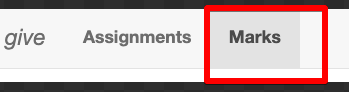
Alternatively, you can login to Vlab (via TigerVNC for the GUI interface) with your zid and password, and then type the following command in the terminal to collect your marks:
9517 classrun -sturec
Please note that marks may not be available through WebCMS's 'Collect Submission' anymore, so please use GIVE or the above command.
If you have any questions or there are any issues, please get in touch ASAP via class email: cs9517@cse.unsw.edu.au
Regards,
Haonan
-
Lab 4 Specification Released
Posted by Yang Song Monday 16 March 2026, 09:37:14 AM.
Hi everyone,
The Lab 4 specification is now available under WebCMS3 > Course Work > Assessments > Lab 4.
The topics in this lab are covered primarily in the Week 5 Monday lecture and tutorial session.
Regards,
Yang -
Project Groups
Posted by Yang Song Tuesday 10 March 2026, 11:18:18 AM.
Hi everyone,
Just a reminder that please form your project group by the Friday of Week 5, and ensure your group is registered on WebCMS3 using the “Groups” function, with all group members listed. Each group should have 5 students.
If we don't see your group information in WebCMS3 after the Friday of Week 5, we will assign you to a group. More information please refer to our earlier announcement on WebCMS3.
-
Lab 3 Specification Released
Posted by Yang Song Monday 09 March 2026, 10:00:29 AM.
Hi everyone,
The Lab 3 specification is now available under WebCMS3 > Course Work > Assessments > Lab 3.
The topics in this lab are covered primarily in the Week 4 lectures and tutorial session.
Regards,
Yang -
Lab 2 Specification Released
Posted by Yang Song Monday 02 March 2026, 10:50:11 AM.
Hi everyone,
The Lab 2 specification is now available under WebCMS3 > Course Work > Assessments > Lab 2.
The topics in this lab are covered primarily in the Week 3 Monday lecture and tutorial session.
Regards,
Yang -
Lab 1 Specification Released
Posted by Yang Song Monday 23 February 2026, 10:54:12 AM.
Hi everyone,
The Lab 1 specification is now available under WebCMS3 > Course Work > Assessments > Lab 1.
The topics in this lab are covered primarily in the lectures on Week 1 Friday and Week 2 Monday, with part of Task 3 covered on Week 2 Friday. The deadline for Lab 1 submission is Week 3 Friday at 6 pm.
If you have any questions about this lab, feel free to discuss with your tutors during the tutorial sessions this week or next, or ask on the forum.
Regards,
Yang -
Project Groups, Final Exam
Posted by Yang Song Thursday 19 February 2026, 10:44:08 AM.
Hi Everyone,
To further clarify, regarding the project groups, please form your project group by the Friday of Week 5. All groups need to be registered on WebCMS3 by using the 'Groups' function (the "Groups" section from the menu). Each group should have 5 students. Group members can be from different tutorial groups. We also allow groups consisting of both undergraduates and postgraduates; that's all up to you.
After Week 5 Friday, if you haven't found a group, we will assign you to a group. If your group contains less than 5 students, we might assign additional members to fill it up. We expect to finalise the project groups by the end of Week 5. Please start forming your groups now as we want this to be the best experience for you. There will not be an opportunity to change groups after the deadline.
Regarding the final exam, we will have an in-person exam on campus during the exam period. The exam contains 50 multiple choice questions and for each question there is a single correct answer. There are no penalty marks for wrong answers. There is a hurdle of 40%, meaning a mark of at least 40% on the final exam (20 correct answers) is required to pass the course.
Regards,
Yang -
Tutorial Times
Posted by Haonan Zhong Wednesday 18 February 2026, 01:13:08 PM, last modified Wednesday 18 February 2026, 01:21:33 PM.
Hi Everyone,
We have now allocated students to their tutorial groups and times, along with the corresponding tutor pairs. You can view the full assignment list under Tutorials >> Tutorial Times and Assignment.
Online tutorials will be started next week and held via Blackboard Collaborate. Access links are available in Moodle >> COMP9517-Computer Vision - 2026 T1 >> Online Tutorials. Please make sure you join the session link that matches your assigned Group Number + Tutorial Time + Tutor Pair.
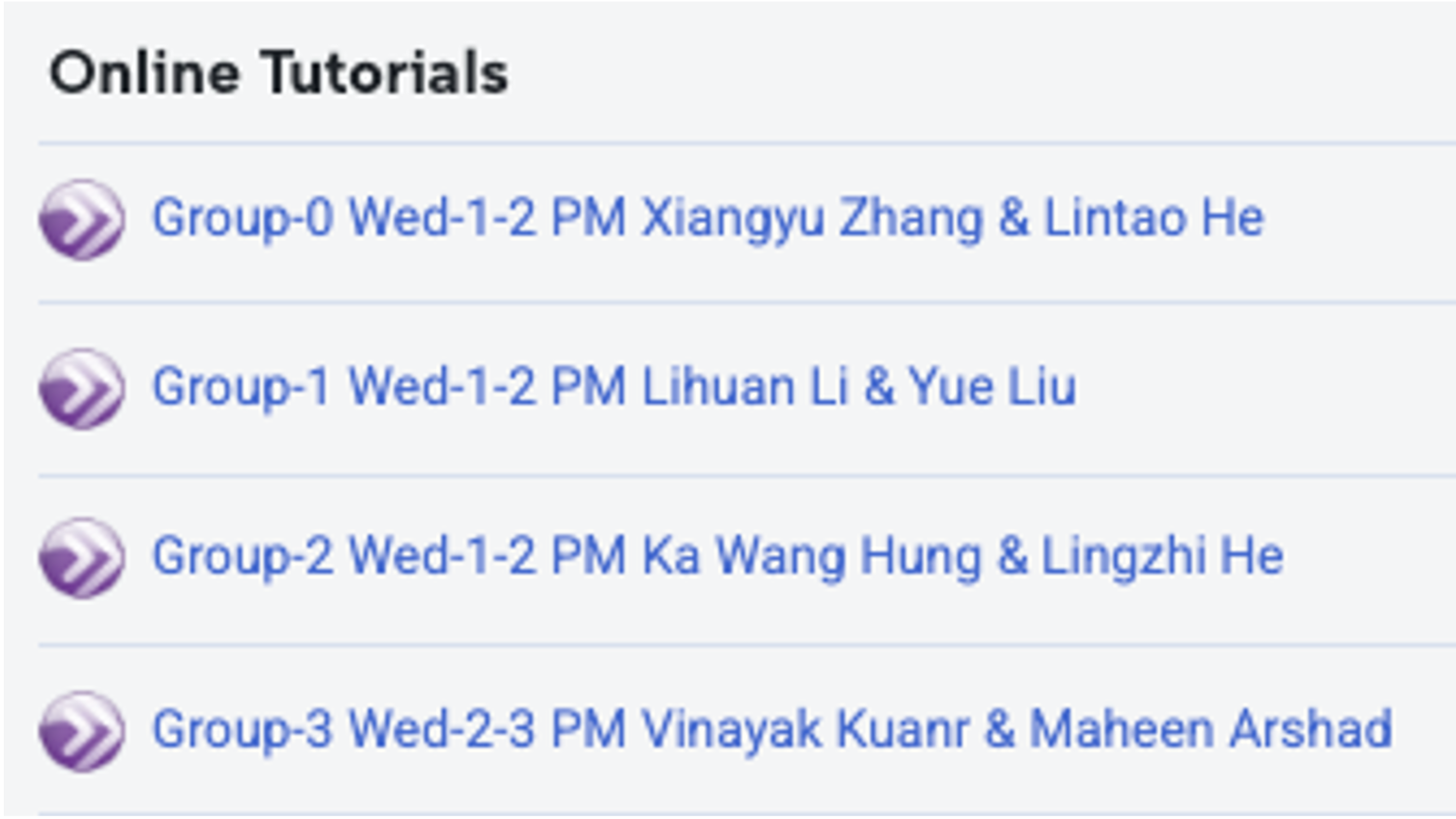
This term, tutorial links are open to all students, so you may attend a different session if necessary. However, to ensure a balanced workload across sessions, we strongly encourage you to attend your allocated tutorial whenever possible. The allocations are based on the time slot you selected through myUNSW, so please double-check that your assigned day and start time are correct.
If you have any questions or there are any issues, please get in touch via class email cs9517@cse.unsw.edu.au
Regards,
Haonan
-
Lab preparation
Posted by Yang Song Monday 16 February 2026, 05:00:49 PM.
Hi everyone,
Tutorials will start next week. For this week, please refer to the lab preparation materials (under "Assessments => Lab Preparations") for the set up and an example Jupyter Notebook. These will be useful for your labs and project.
-
Lecture live streaming
Posted by Yang Song Monday 16 February 2026, 04:26:59 PM.
Hi everyone,
My sincere apologies that the live streaming did not work today. I have checked with the School Office, and the lecture settings have now been reconfigured. I hope everything will run smoothly on Friday!
Best regards,
Yang -
Welcome to COMP9517 2026 T1
Posted by Yang Song Thursday 12 February 2026, 04:45:17 PM.
Dear Students,
Welcome to COMP9517 starting next week. Please have a look at the Course Outline (available in ECOS via the menu on WebCMS3) for more details on what to expect and what's expected in this course.
The lectures will be delivered both in-person on campus and online via the Live Streaming option in Echo360 . All lectures will also be recorded. The links to lectures in Echo360 (both live streaming and recordings) can be accessed via Moodle (under "Lecture Recordings").
Tutorials will start in Week 2 and will be online via Blackboard Collaborate , which will be accessible via Moodle. You will be allocated to a tutor group later in Week 1 based on your enrolment information, and then you will have access to Blackboard Collaborate links in Moodle. There are no tutorial sessions in Week 1 but we will release some pre-lab preparation material in Week 1.
We will upload lecture slides here (under Course Work => Lectures) every Monday morning for that week. Please note that Friday Week 7 and Monday Week 8 are public holidays, so we won't be able to do lectures in-person or online on those days. We will upload lecture recordings directly to Echo360 for those two days, and for questions, please ask the lecturer during other sessions or on the forum.
We will post more instructions here regarding the assignments, project groups, final exam, etc.
For discussion forum, we will use Discourse (see the "Course Forum" link in the menu on WebCMS3). The forum is monitored daily and we do our best to answer within 24 hours. For more individual questions, please email the class account: cs9517@cse.unsw.edu.au .
In the past few years we have had large student numbers every term, which keeps challenging us. Clearly, interest in computer vision and its many applications is growing rapidly. Please bear with us as we do our best solving technical challenges in making the course an enjoyable experience for you.
On behalf of the entire COMP9517 26T1 Team, which includes co-lecturer Dr Sonit Singh, course admin Haonan Zhong, and our 26 Tutors, I wish you a great time learning Computer Vision!
Yang Song
Lecturer in Charge