To get the same version of JOGL that is on cse machines get the library jars
http://jogamp.org/deployment/v2.3.2/archive/jogamp-all-platforms.7z
After unzipping, to set up jogl in eclipse we need to inform Eclipse where to find the JOGL library files.
In Eclipse, use the menu bar and go to Window → Preferences → Java → Build Path → User Libraries:
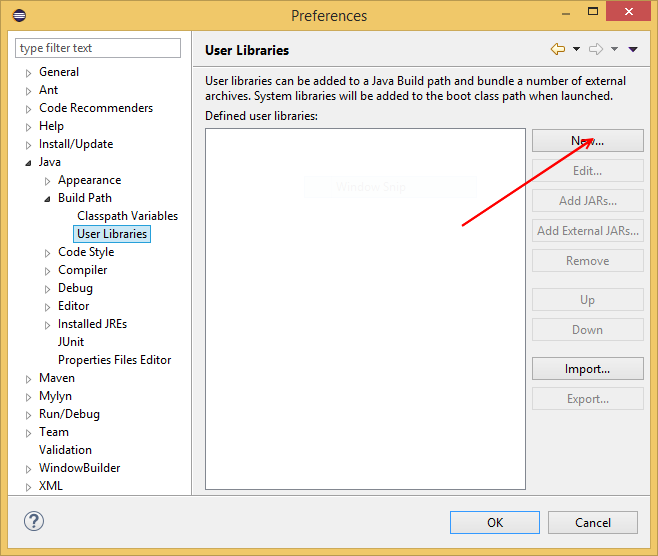
Press New in the above window, write JOGL for the library name and press OK. Next, select the JOGL entry from the User Libraries window and press Add External JARs:
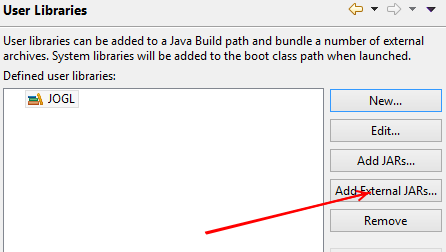
and add the jar files jogl-all.jar and gluegen-rt.jar to your build path.
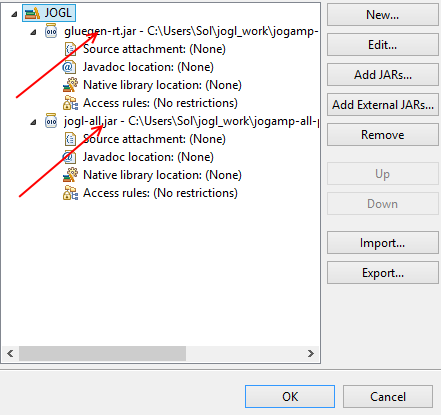
Note: Don't delete the rest of the files in the folder that you unzipped.
You can also optionally (and it is a good idea) to link the javadoc for jogl and gluegen and the src (already contained in the first file you downloaded) inside eclipse too.
Using JOGL in a project
To use jogl in your next project, create a new Java project: File → New → Java Project:
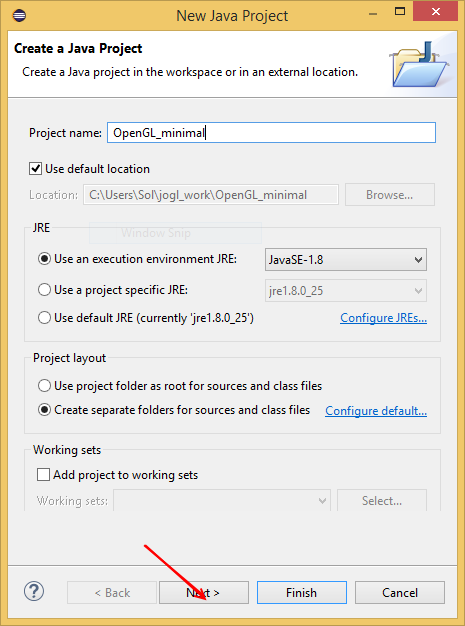
Press Next, select the Libraries tab and press Add Library:
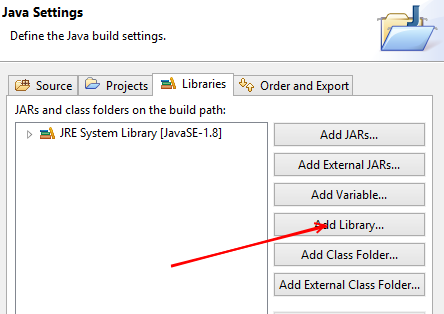
On the Add Library window, select User Library and press Next, on the next window select your JOGL library and press “Finish”:
Resource created Tuesday 11 July 2017, 12:47:07 PM, last modified Tuesday 25 July 2017, 06:05:56 PM.